
Company & dealer updates
HITEK CRM: From the First Quote to the Finished Install
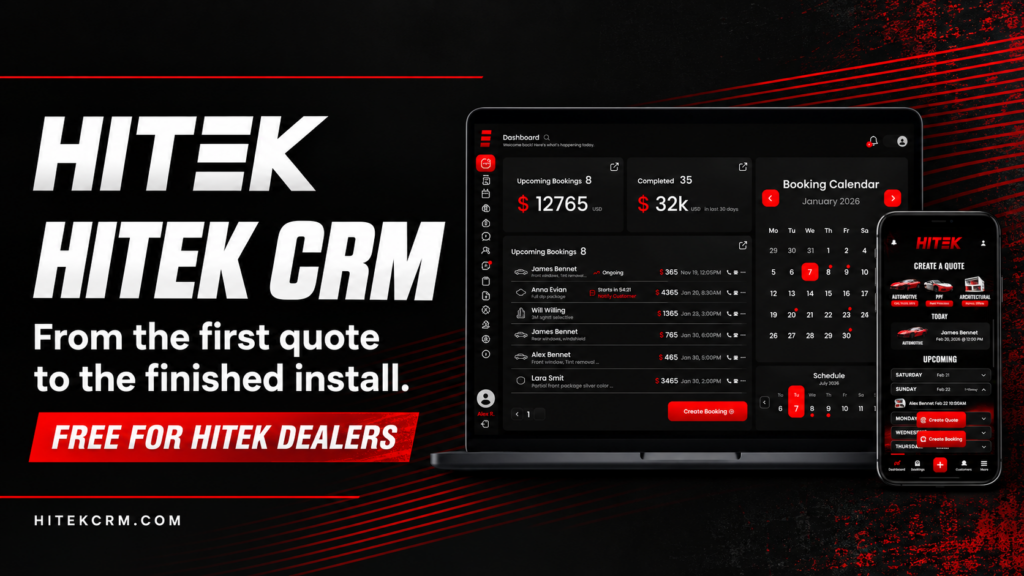
Running a tint shop means keeping track of more than the vehicles in the bay. Customer inquiries need a response, quotes need follow-up, and booked jobs need clear details before the installation begins.
HITEK CRM connects those parts of the business in one system. Built for window tint, PPF and related installation businesses, it brings customer management, quotes, bookings and job tracking into a shared workflow.
For HITEK dealers, HITEK CRM is free.
Here is how its features fit into a typical day at the shop.
Start with the Customer
A customer contacts your shop about tinting their vehicle. They want to discuss film options, understand the price and find an appointment that works for them.
That first conversation creates information your team will need again. Keeping customer details and activity together gives the next person handling the job a place to review what has already happened.
HITEK CRM lets shops organize leads, store customer information and review previous job activity. When someone returns for another vehicle or asks about an earlier installation, those details remain connected to the customer.
Consistently updating the record also makes follow-up more useful. Your team can review the customer’s position in the process before starting the next conversation.
Turn the Conversation into a Quote
Once the service is discussed, the next step is giving the customer a proposal they can review.
HITEK CRM supports creating and sending quotes through a customer link. The platform also provides visibility into when a proposal has been opened, viewed or accepted.
That gives your team context for the next step. A quote that has not been viewed may need a different follow-up than one the customer has reviewed but still has questions about.
Keeping the proposal within the same workflow also gives the shop a reference when the customer is ready to move forward. The quote becomes part of the job’s progression rather than a separate document someone needs to find later.
Connect the Booking and Deposit
An accepted proposal needs to become a scheduled job.
HITEK CRM’s booking workflow lets customers review their proposal, choose an appointment time and pay a deposit online. The booking is then added to the shop’s calendar.
Shops configure their services, pricing and deposit requirements during setup. Online payment collection also requires connecting payments.
Those settings deserve attention before sending the first customer link. Review how your services are named, what the customer sees and which deposit requirements apply. Clear setup helps the booking process reflect the way your shop operates.
Before using the system for daily bookings, walk through the process with your team so everyone understands how a quote becomes a confirmed appointment.
Keep the Schedule and Job Status Visible
Once an appointment is booked, the work shifts toward preparing for and completing the installation.
HITEK CRM gives shops a way to review upcoming bookings, track active jobs, update job status and look back at completed work.
That visibility matters when different people handle the front desk and installation. A useful job record gives the team somewhere to check progress without relying entirely on verbal updates.
The system supports the workflow, while the team’s habits keep it useful. Updating a job when its status changes helps the next person see a current picture of the work.
Keep Communication Close to the Work
Questions can continue after the quote is sent or the appointment is booked.
HITEK CRM includes customer messaging inside the app, giving shops another way to keep communication within their business workflow. Its features also include automated appointment reminders.
These tools can support consistent communication as a job approaches. Shops should still review their reminder setup and make sure customers receive clear information about their appointment.
The dashboard also provides visibility into bookings, customer activity, job status and revenue, helping owners review the business alongside the installation schedule.
Work from Desktop or Mobile
Shop management does not happen only at a desk.
HITEK CRM supports desktop and mobile access, so customer details, quotes, bookings and job updates can stay accessible throughout the day.
The front desk can review the schedule while someone elsewhere in the shop checks the information they need for an upcoming job. Mobile access also provides flexibility when the owner is away from the counter.
Whether you are reviewing tomorrow’s appointments or updating a job that just finished, access across devices helps keep the same workflow available where the work happens.
Get Started with HITEK CRM
HITEK CRM gives dealers a connected way to manage the business surrounding each installation, from the first customer inquiry through the completed job.
Start by adding your business information, configuring your services and reviewing the customer booking process. Establishing a consistent routine for quotes, communication and job updates helps the system become part of daily shop operations.
HITEK CRM is free for HITEK dealers.